
Project numbers you can stand behind.
Untrusted forecasts. Resource conflicts. Painful month-end reconciliation. Connect priorities, allocation, plans, forecasts and actuals in one governed platform — and make every decision with confidence.
Free for active single users · No credit card required
When project data is disconnected,
control becomes guesswork.
Spreadsheets and fragmented tools can show you a number. ProjectFiles helps establish where that number came from, who is committed and what needs to change.
Forecasts you can't trust
Bring resource costs, project plans, actuals and revisions into a traceable financial picture.
Resources in conflict
See capacity, allocation, utilisation and capability gaps before commitments turn into delivery issues.
Month-end firefighting
Support a repeatable reconciliation, review and approval cycle rather than another scramble for spreadsheets.
From resource capacity to financial commitments.
Built for teams that need more than task tracking: dependable control over what is planned, funded, used and reported.
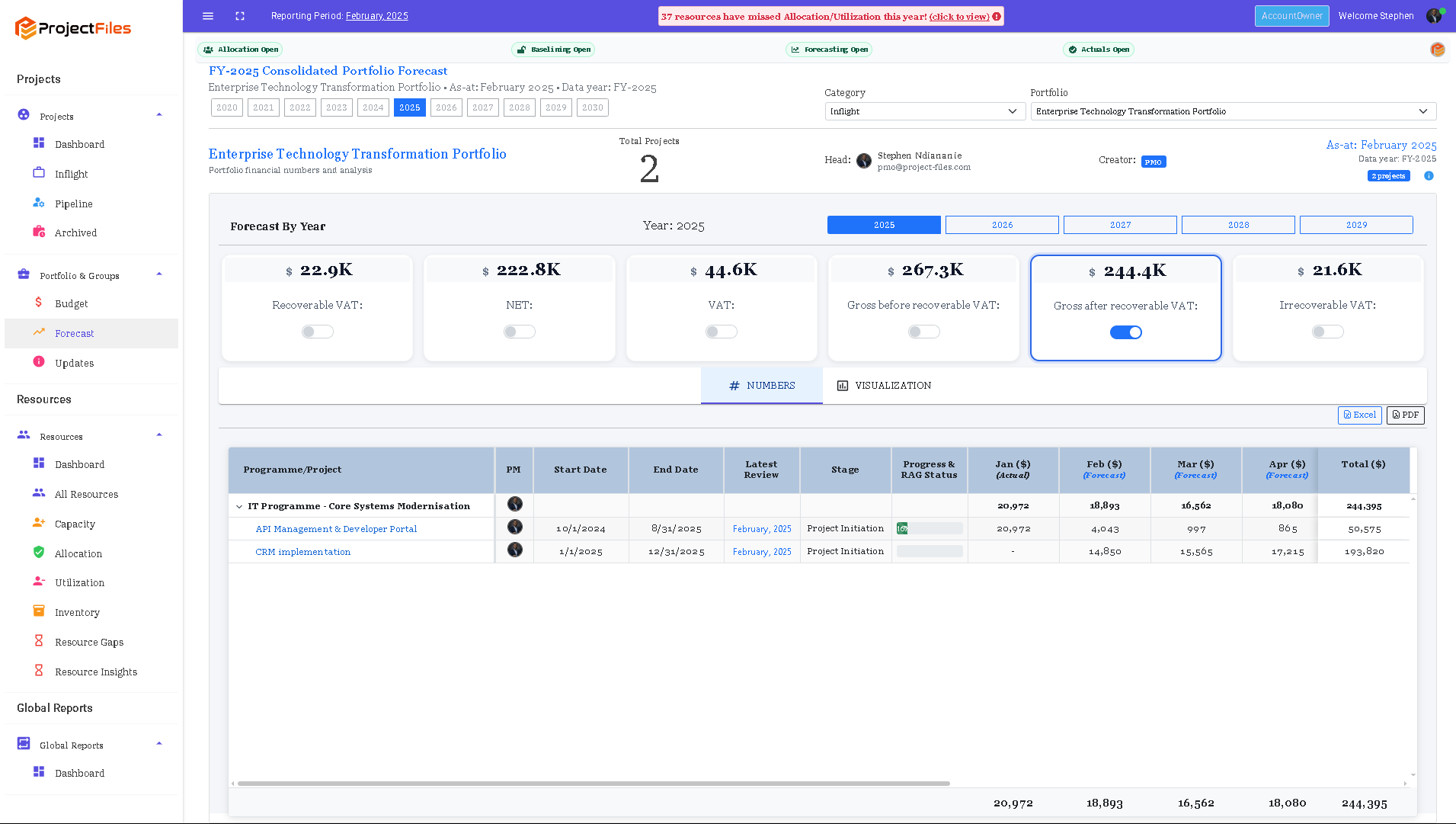
Know what your portfolio will cost — and why.
Explore consolidated financial forecasts across projects and periods, with visibility of net, tax and gross cost measures.
- Rolling monthly and annual forecast visibility
- Drill down from portfolio totals to project costs
- Support baseline, actuals and reforecast reviews
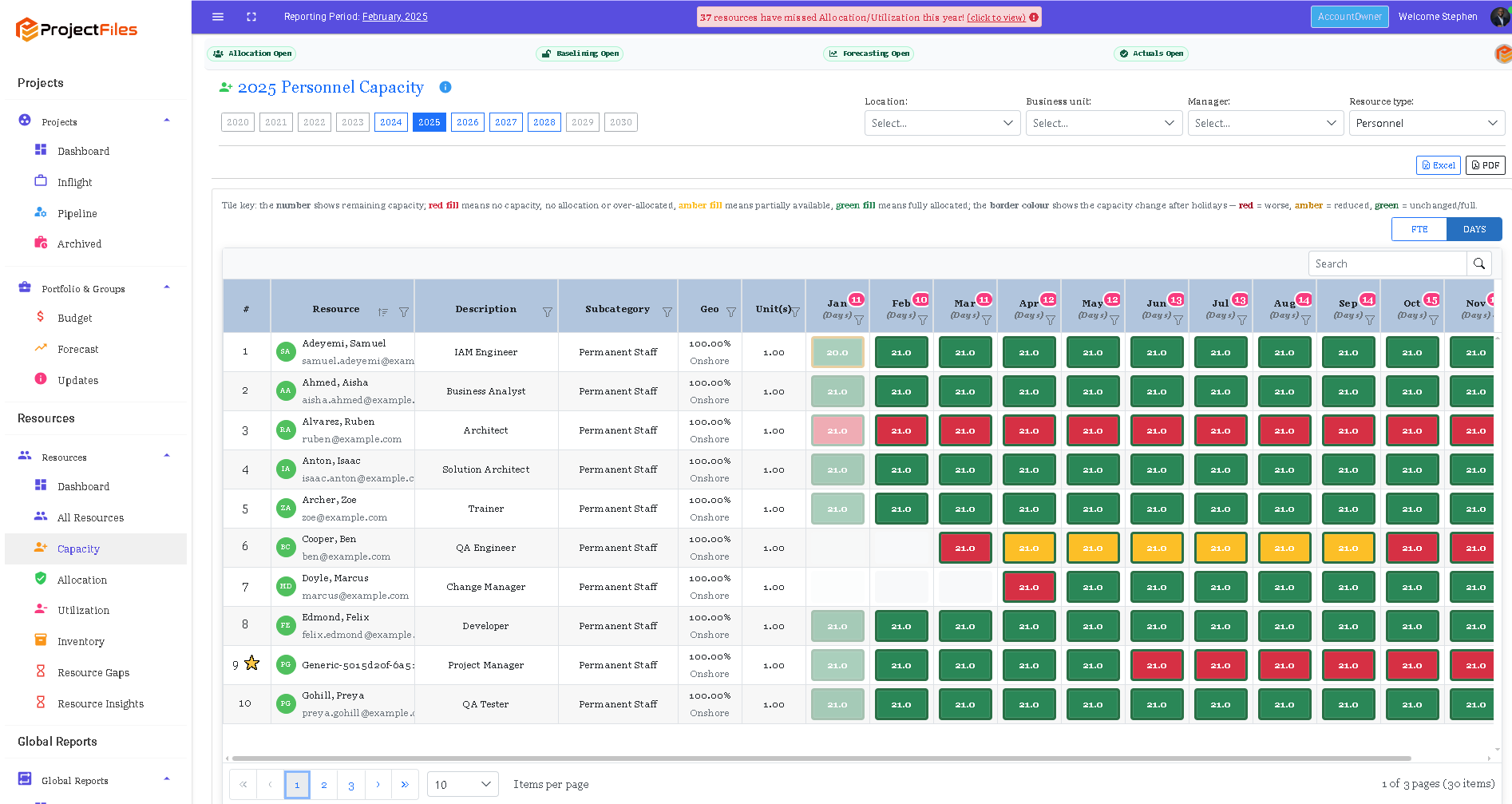
See capacity and resource conflicts before they hit delivery.
Review a year of personnel capacity and allocation at a glance. Identify shortages, available capacity and allocation exceptions.
- Monthly resource capacity grid
- Role and resource-level visibility
- Understand availability and allocation constraints
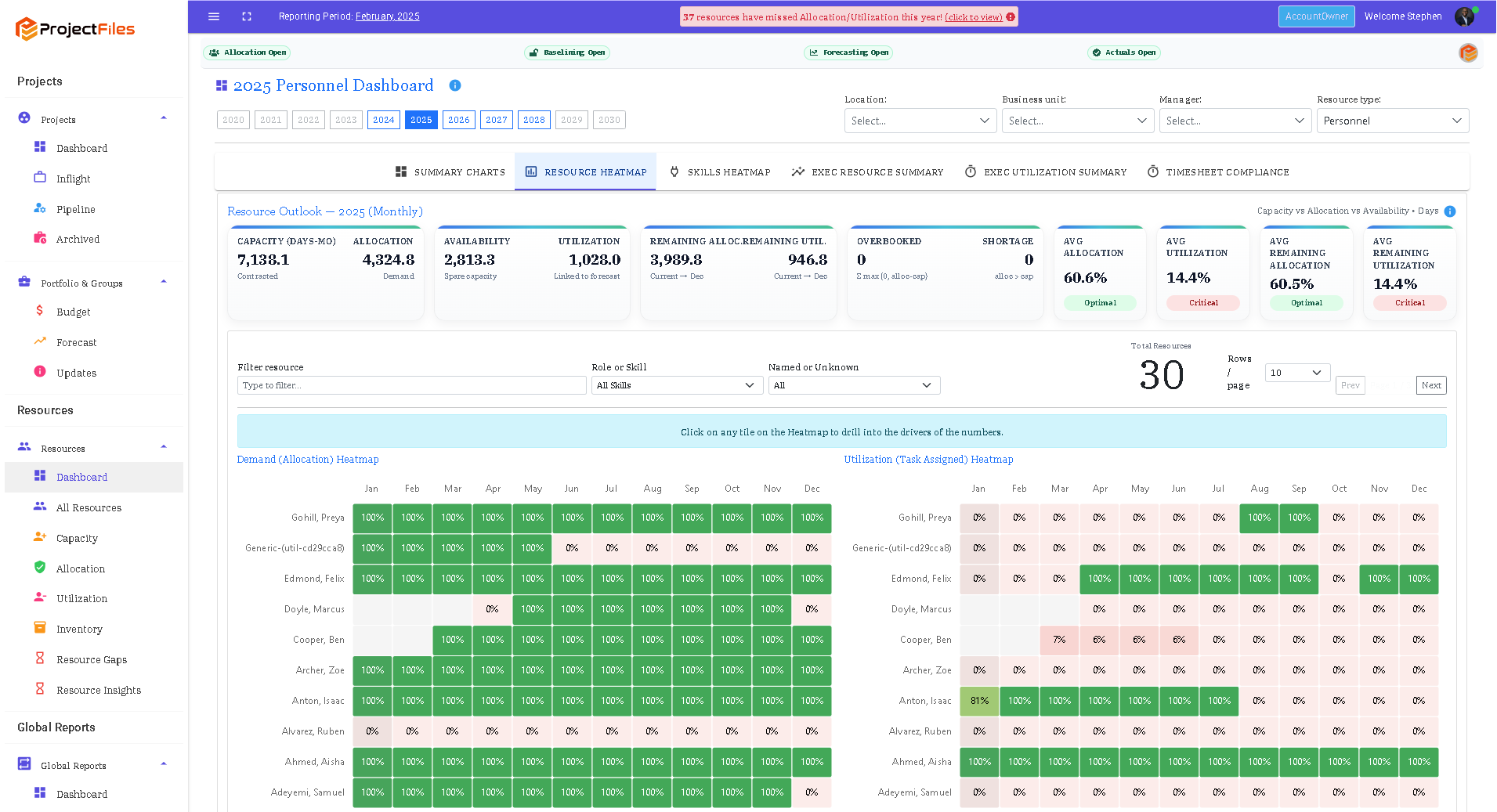
Allocated does not mean utilised.
Compare committed resource capacity with task-driven utilisation so your team can spot unused allocations and work that lacks suitable coverage.
- Side-by-side allocation and utilisation heatmaps
- Named and placeholder resource perspectives
- Portfolio-wide resource insight
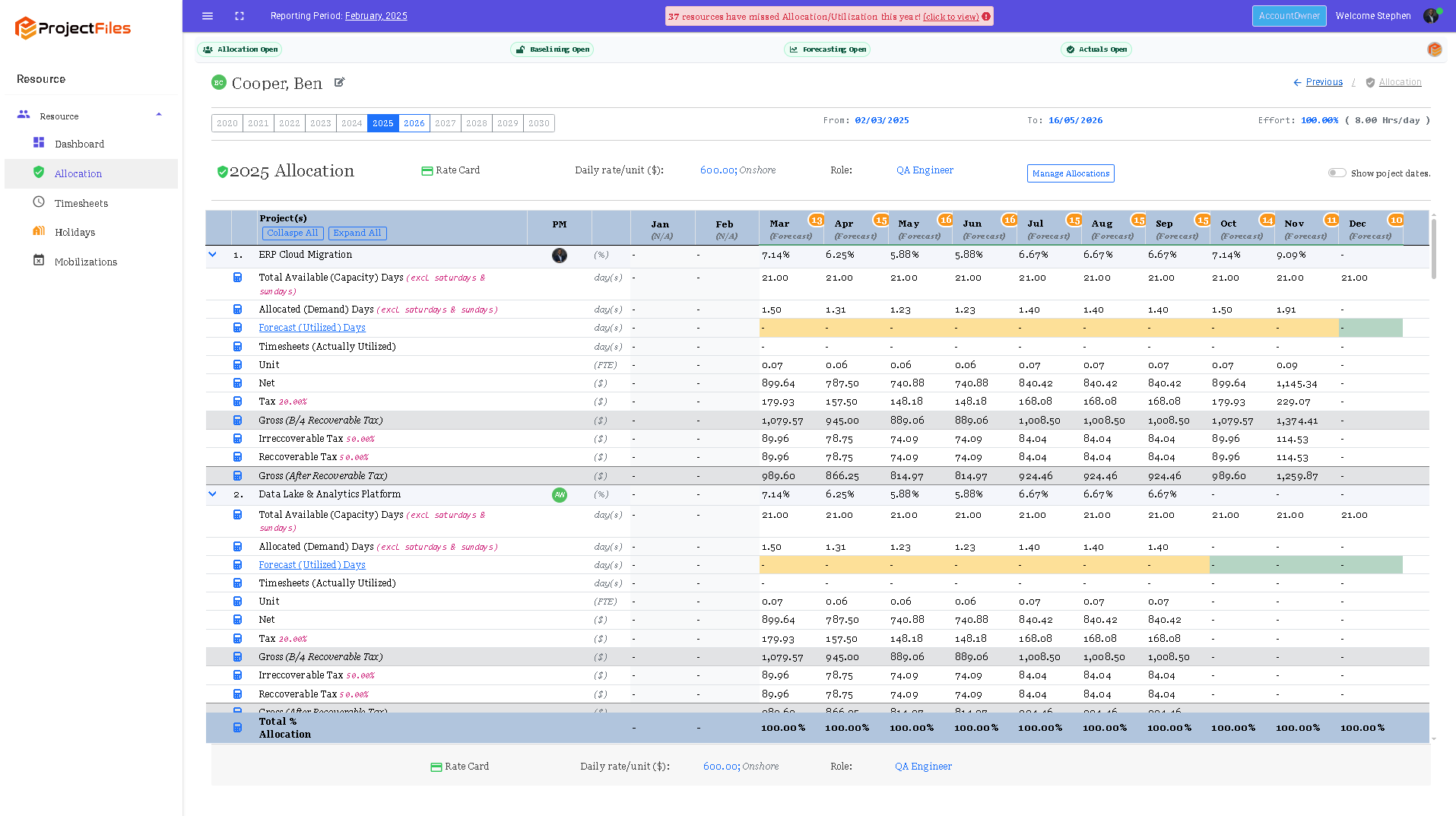
See how resource decisions affect project cost.
Connect approved allocations and rate cards to project demand and forecast cost. Understand the monthly financial effect of each resource commitment.
- Resource-to-project allocation detail
- Rate-driven cost view
- Monthly planning and actual utilisation visibility
Govern the whole journey. Not just the status report.
ProjectFiles links your investment decisions, resource commitments, financial plans and monthly evidence into a consistent management process.
No allocation → no project task assignment → no forecast → no timesheet.
Governance rules that help keep the numbers connected to real commitments.
One source of control. Different decisions.
From the PMO to the finance team, give each role the same underlying governance evidence.
PMO leaders
See the health, commitments and financial outlook of the whole portfolio.
Finance partners
Challenge forecasts, reconcile actuals and understand the drivers of variance.
Resource managers
Balance availability and demand before approving commitments.
Project managers
Plan and report against resources, costs and agreed governance expectations.
Bring your project numbers
under control.
Connect resource commitments, forecasts and actuals. Give your whole team a shared view—with unlimited users on paid standard plans. Choose the capacity that fits your organisation.
Swipe or scroll sideways to compare all seven plans.
Starter
Establish your first control cycle
Start with a small team and put a repeatable project control cycle in place.
£0while active
Free while actively used. No credit card required.
5 total usersIncluding timesheet-only users
- Project and portfolio governance
- Resource allocation, forecasts and actuals
- Community support
Team
Bring your delivery team together
Give project managers, resource owners and finance a connected view of delivery.
£500/ month
£5,000 a year, paid upfront · save £1,000
Unlimited usersIncluding timesheet-only users
- Project and portfolio governance
- Resource allocation, forecasts and actuals
- Standard support
Business
Run a consistent PMO cycle
Connect resource reviews, monthly reconciliation and portfolio governance across your PMO.
£1,000/ month
£10,000 a year, paid upfront · save £2,000
Unlimited usersIncluding timesheet-only users
- Project and portfolio governance
- Resource allocation, forecasts and actuals
- Standard support
Portfolio
Govern several programmes
Coordinate resources and financial forecasts across a larger project portfolio.
£2,000/ month
£20,000 a year, paid upfront · save £4,000
Unlimited usersIncluding timesheet-only users
- Project and portfolio governance
- Resource allocation, forecasts and actuals
- Standard support
Enterprise
Extend control across your organisation
Bring more teams into a consistent approach to resource and financial governance.
£3,500/ month
£35,000 a year, paid upfront · save £7,000
Unlimited usersIncluding timesheet-only users
- Project and portfolio governance
- Resource allocation, forecasts and actuals
- Standard support
Enterprise Plus
Scale your portfolio governance
Support a larger managed workforce with the same connected control foundation.
£6,000/ month
£60,000 a year, paid upfront · save £12,000
Unlimited usersIncluding timesheet-only users
- Project and portfolio governance
- Resource allocation, forecasts and actuals
- Standard support
Partner & Bespoke
For client and tailored delivery
Deliver across client workspaces or agree a package around your organisation.
Let’s talk
Flexible pricing and billing terms.
Agreed workspace usersUnlimited timesheet-only users
- Client & multi-workspace delivery
- Tailored support and onboarding
- Bespoke commercial terms
Starter includes five users in total. Team through Enterprise Plus include unlimited users, including timesheet-only users, at no additional user charge. Partner & Bespoke has tailored workspace-user allowances and includes unlimited timesheet-only users.
Compare plans
On smaller screens, scroll the table sideways to compare all seven plans.
| Plan features | Starter | Team | Business | Portfolio | Enterprise | Enterprise Plus | Partner & Bespoke |
|---|---|---|---|---|---|---|---|
| Monthly subscription | £0 | £500 | £1,000 | £2,000 | £3,500 | £6,000 | Contact us |
| Annual subscription · paid upfront | £0 | £5,000 | £10,000 | £20,000 | £35,000 | £60,000 | Agreed terms |
| Managed people · active personnel | Up to 25 | Up to 50 | Up to 100 | Up to 250 | Up to 500 | Up to 1,000 | Flexible |
| Workspace users | 5 total users | Unlimited | Unlimited | Unlimited | Unlimited | Unlimited | Flexible |
| Timesheet-only users | Within the 5-user total | Unlimited & included | Unlimited & included | Unlimited & included | Unlimited & included | Unlimited & included | Unlimited & included |
| Portfolios / programmes / projects | Unlimited | Unlimited | Unlimited | Unlimited | Unlimited | Unlimited | Flexible |
| Capacity & allocation | ✓ | ✓ | ✓ | ✓ | ✓ | ✓ | ✓ |
| Resource rate cards & costed allocations | ✓ | ✓ | ✓ | ✓ | ✓ | ✓ | ✓ |
| Planning & forecasting | ✓ | ✓ | ✓ | ✓ | ✓ | ✓ | ✓ |
| Actuals & reconciliation | ✓ | ✓ | ✓ | ✓ | ✓ | ✓ | ✓ |
| RAID & governance | ✓ | ✓ | ✓ | ✓ | ✓ | ✓ | ✓ |
| Baselines & audit trail | ✓ | ✓ | ✓ | ✓ | ✓ | ✓ | ✓ |
| Reports / exports | ✓ | ✓ | ✓ | ✓ | ✓ | ✓ | ✓ |
| Multi-user collaboration | ✓ | ✓ | ✓ | ✓ | ✓ | ✓ | ✓ |
| Role & project permissions | ✓ | ✓ | ✓ | ✓ | ✓ | ✓ | ✓ |
| Approvals | ✓ | ✓ | ✓ | ✓ | ✓ | ✓ | ✓ |
| Support level | Community | Standard | Standard | Standard | Standard | Standard | Tailored |
| Client / multi-workspace delivery | — | — | — | — | — | — | By agreement |
| Partner / consultancy delivery package | — | — | — | — | — | — | By agreement |
| Bespoke commercial arrangements | — | — | — | — | — | — | By agreement |
| Rollout & implementation services | Separately agreed | Separately agreed | Separately agreed | Separately agreed | Separately agreed | Separately agreed | By agreement |
| Dedicated hosting & custom integrations | Separately agreed | Separately agreed | Separately agreed | Separately agreed | Separately agreed | Separately agreed | By agreement |
Pay for managed people, with clear limits.
- Standard-plan allowances cover mobilised active personnel managed in your workspace. Partner & Bespoke capacity is individually agreed.
- Archived historical resources are excluded from the active allowance.
- Each band is the total allowance for that plan, not an additional block. Team covers up to 50 people in total.
- Choose a larger plan before exceeding your allowance.
Start free with a small team.
- Up to 25 managed people and five users in total, including timesheet-only users.
- Free while the workspace remains actively used, with no credit card required.
- Accounts inactive for three months may be closed.
- Complete at least three ProjectFiles control cycles each year to maintain free access.
- Community support. Upgrade when you need more users or a larger managed-people allowance.
Need help with your rollout or client delivery?
Starter includes community support. Team through Enterprise Plus include standard support. Partner & Bespoke support and onboarding are tailored to your agreement. Dedicated hosting, custom integrations, implementation, bespoke development and hands-on PMO services are separately agreed unless explicitly included in your Partner & Bespoke package.
For more than 1,000 managed people, consultancy delivery or a tailored arrangement, talk to us about your requirements.
All prices are in GBP and exclude VAT where applicable. Annual subscriptions for Team through Enterprise Plus are paid upfront and equal ten monthly payments. Partner & Bespoke prices and billing terms are individually agreed. Your agreed subscription price remains fixed during your contracted pricing period. Separately agreed services are not included in the subscription price.
Numbers that hold up when challenged.
See how ProjectFiles could help your team move from explaining variances to controlling what happens next.